Module vignette 3: harmonize target sensors
Notebook: View the Landsat harmonization notebook in the repository. GitHub displays the cells; clone or download the file to run them.
Use this module when a corrected NEON cube exists and you want reflectance in configured target-sensor bandspaces such as Landsat or MicaSense. SpectralBridge integrates corrected spectra against the registered spectral response definitions.
Continue the standard run
Rerun the same spectralbridge-pipeline command used to create the corrected
cube. Earlier valid stages will be skipped and each target sensor will be
checked independently.
spectralbridge-pipeline \
  --base-folder spectralbridge_output \
  --site-code NIWO \
  --year-month 2023-08 \
  --product-code DP1.30006.001 \
  --flight-lines NEON_D13_NIWO_DP1_L020-1_20230815_directional_reflectance \
  --engine thread \
  --max-workers 2
Read the sensor summary in the log. It separates products that were created, already existed, or failed.
Confirm the result
Target products follow the pattern:
<flightline>_<sensor>_envi.img
<flightline>_<sensor>_envi.hdr
<flightline>_<sensor>_envi.parquet
Use the matching ENVI header to interpret band order and wavelengths. Use the Parquet sidecar or merged table for tabular analysis.
Validate against a real Landsat observation
Synthetic target bands test spectral integration; they are not real satellite observations. The independent real-observation workflow compares a full corrected NEON flight with one explicitly selected Landsat Collection 2 Level-2 surface-reflectance scene, aggregating NEON to the actual 30 m footprints.
NEON hyperspectral -> correction -> synthetic OLI-like bands
                                      |
                              actual pixel-area aggregation
                                      |
                           compare with REAL Landsat SR
Use the seven-band flight workflow separately from the existing optional drone comparison. It preserves every search candidate, QA_PIXEL and QA_RADSAT exclusions, full-cell coverage, common support for adjusted/undarkened products, block-bootstrap uncertainty and original-versus-shifted registration diagnostics. It fits no calibration correction.
from spectralbridge.landsat_flight_validation import (
    FlightValidationInput, compare_flight_to_real_landsat,
)

flight = FlightValidationInput(
    flight_id="my_flight", site="NIWO",
    acquisition_datetime="2023-08-15T18:30:00+00:00",
    corrected_raster="products/corrected.img",
    undarkened_raster="products/landsat_oli_undarkened.img",
    adjusted_raster="products/landsat_oli.img",
    synthetic_scale_factor=10000,
    time_provenance="Verified flight acquisition metadata in UTC",
    timezone_verified=True,
)
result = compare_flight_to_real_landsat(flight, "validation/my_flight")
The paths and timestamp above are illustrative. Supply verified metadata and seven
numeric physical wavelength coordinates. Missing/ambiguous band identities are
refused; generic band_01 wavelength headers need a production metadata repair,
not numerical inference. Acquisition time requires an explicit timezone/basis;
legacy assumptions must be disclosed. Existing source files are read in place.
Cross-CRS footprint intersections require Shapely 2 and pyproj; registration offsets currently
require the synthetic and reference grids to share a projected CRS. Reproject and
validate a product explicitly before using offsets across CRSs; the workflow does
not silently shift it. Public remote reads require pystac-client and
planetary-computer in addition to the raster dependencies.
The reproducible command-line example accepts a JSON object with those input fields:
python examples/real_landsat_validation.py flight.json --output validation/my_flight
Default gates are >=90% valid area of each full Landsat footprint and at least 100
matched pixels. Results include compact pixel_metrics.parquet, scene selection,
band/flight/brightness/registration/subset metrics, QA and scientific figures, and
a checksum manifest. Valid completed outputs are reused for matching source,
configuration and implementation identities. No scene/cloud-only outcomes are
explicit statuses, not failed translation metrics. Across-flight summaries read
only compact completed outputs through summarize_flight_validations and equally
weight flights.
R10C pilot: one flight, next-day Landsat 8
The archived real 15 September 2021 R10C flight was compared with product
LC08_L2SP_033032_20210916_20210925_02_T1. There were 3,583 accepted Landsat
footprints and 56 spatial blocks. Undarkened band correlations were 0.810-0.945,
median seven-band angle 2.089 degrees and pooled RMSE 0.01477 unitless reflectance.
The original alignment was best among nine declared 30 m offsets; no shift was
applied. More homogeneous footprints agreed better, but contrast discrepancies
remained. Adjusted pooled RMSE was 0.01459; its paired improvement interval spanned
zero, with clear NIR improvement and SWIR2 worsening.
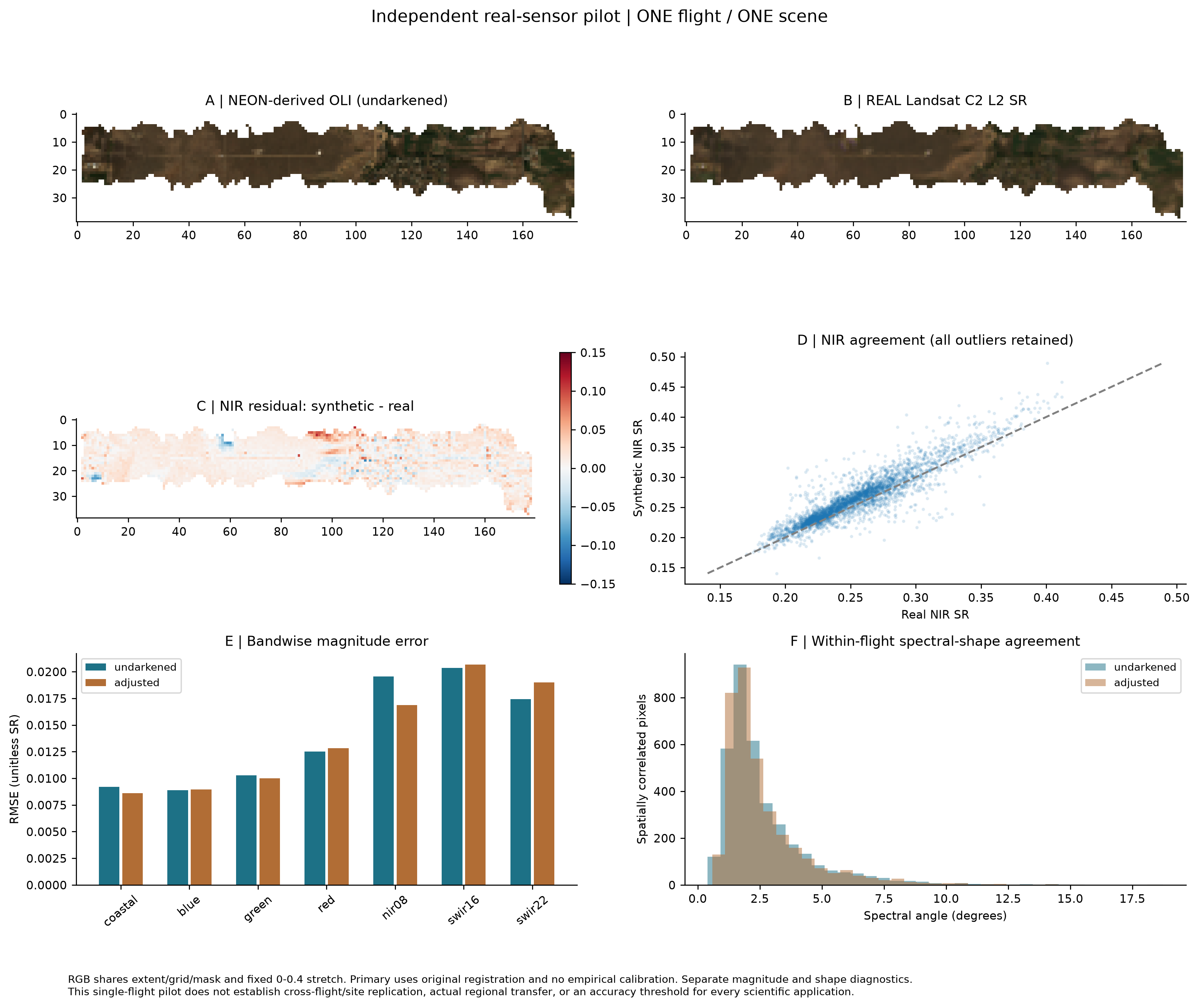
The +22.37-hour offset is conditional on interpreting the legacy NEON "computer time" as UTC. No same-day OLI gold case or cross-flight/site replication was available. This supports a qualified real-observation pilot, not sensor interchangeability or a universally beneficial brightness adjustment. Different spatial support/PSF, acquisition times, atmosphere, viewing and solar geometry, response approximations, registration and processing normalization prevent perfect identity. These discrepancies cannot all be attributed to translation error.
Full design, all ten scientific questions, methods, candidate scenes, compact records and PDF/PNG/SVG figures are preserved in the repository's real Landsat provenance. Independent real-observation agreement is scoped to this acquisition pair; cross-flight, cross-site and held-out calibration generalization remain untested. See the scientific validation levels.
Continue
- Build analysis tables
- Review QA outputs
- Technical details: stage contracts and configuration